creative
Real clothes, AI models: making a Kowloon fashion film
I used real clothing photographs to direct 24 five-second AI video candidates, then cut selected moments with archival Hong Kong footage. The video-generation estimate came to US$23.76. In the finished film, the five-second arcade take gets less than a second.
An agent handled reference files, scene versions, generation jobs and downloads. I directed the people and gestures, reviewed the results and made the final edit in Final Cut Pro. The workflow gave me a folder of traceable shots to cut into the 47-second film below.
An independent Lyfar Studio fashion study. The Dries Van Noten title and referenced clothes are part of the creative concept; this is not a commissioned or affiliated brand campaign. The figures below cover video generation, with the full exclusions beside the cost table.
Give the models something to do
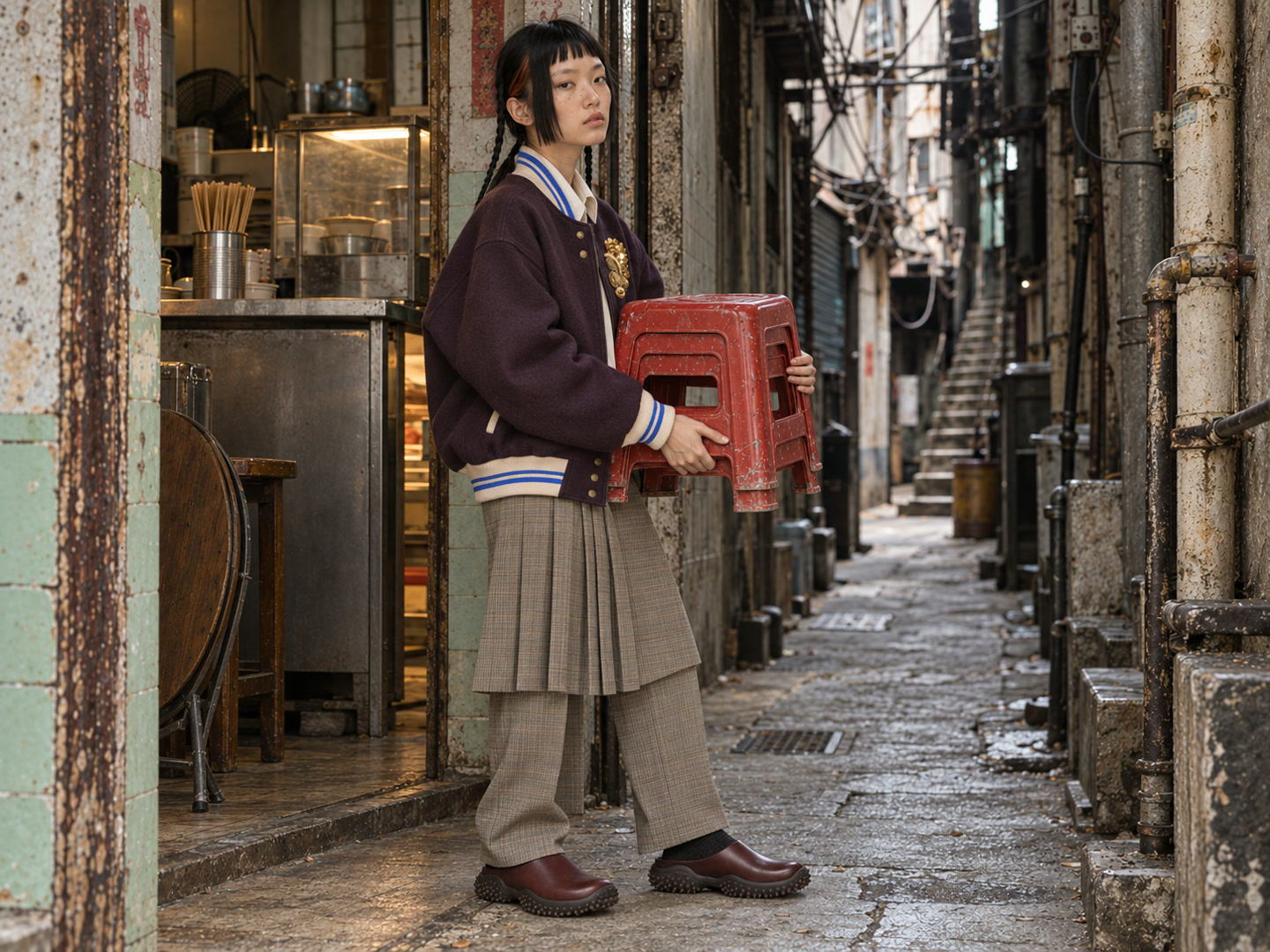
I wanted contemporary fashion inside a historical Kowloon Walled City setting: Dries Van Noten prints, strange haircuts, expensive shoes, people doing ordinary things. A model carrying a stack of red stools. Another weighing dried peel behind a shop counter. Two people watching a small television.
The action mattered. A face against a dirty wall gives you a portrait. Carrying three stools gives you weight, a grip, a reason to move through the room. You can direct that.
I set the art department around 1989 and mixed in 2026 clothes, plus early digital cameras and keypad phones. That collision was deliberate. The invented shops and characters aren’t a historical reconstruction.
The cast grew to 12 fictional Asian adults, all specified as 19. I asked for freckles, uneven features, visible skin texture, mildly prominent ears and haircuts with character. Red, platinum, blue, cropped green. I kept a description and reference frame for each identity so changing a coat wouldn’t mean casting a new face.
Start with the clothes you can point to
The wardrobe started with the Dries Van Noten AW26 collection . We downloaded official product photographs and recorded their product links. I then mixed pieces into 19 looks, including Adidas shoes and Miu Miu mules.
A product photograph lets you specify the collar, pockets, hem and colour relationships. “Expensive fashion” leaves those choices to the image model.
For the stool scene, I combined a plum embroidered bomber , wool skirt trousers and Miu Miu leather mules .
01 · Real garment references
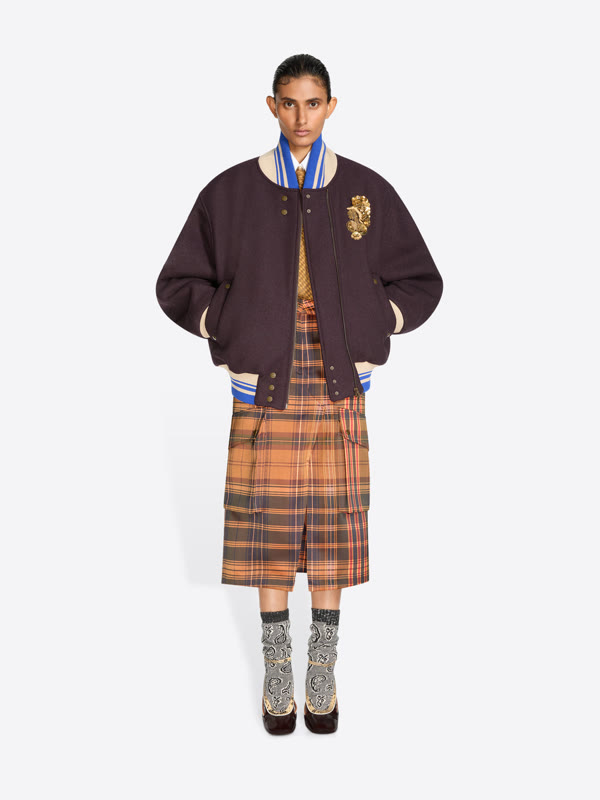
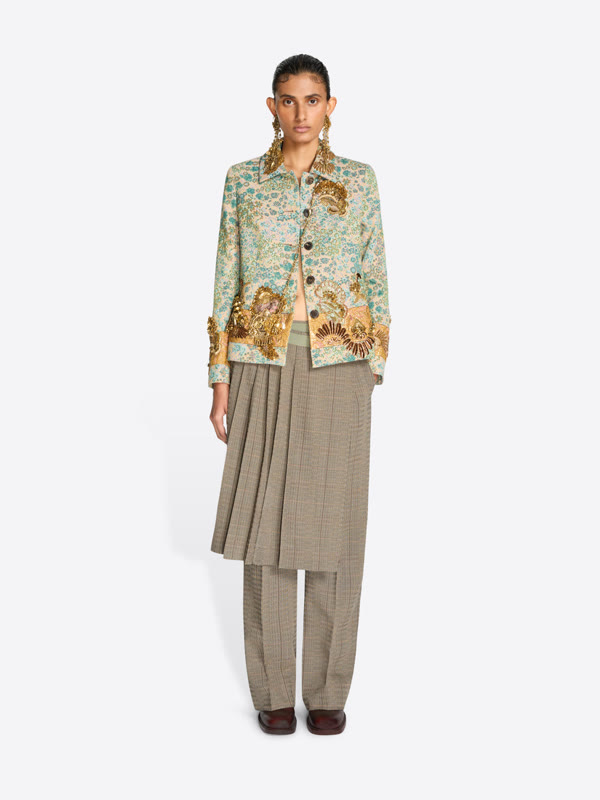
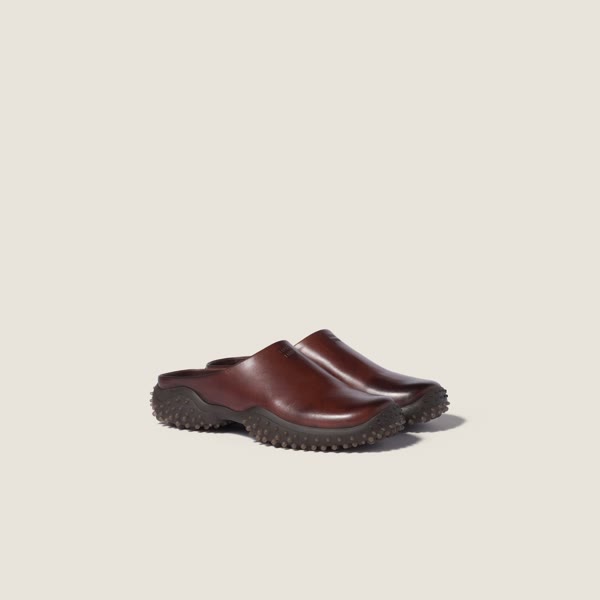
Product photographs: Dries Van Noten and Miu Miu. Individual photographers not listed on the source pages. Click a garment name for the original product page.
02 · Generated first frame · S27

03 · Five-second motion take
Read the saved motion direction
The woman takes two short grounded steps toward camera-right along the passage, carrying the compact nested stack of three red stools at the same central waist position shown in the image. Both hands maintain their original grips.
Excerpt from the submitted prompt. Wan 3, requested 1080p, five seconds. First frame v001; motion take m001.
In the herbal shop, I layered a red marbled velvet dress over a teal printed silk blouse . The brass balance gave us a small, legible action to animate.
01 · Real garment references
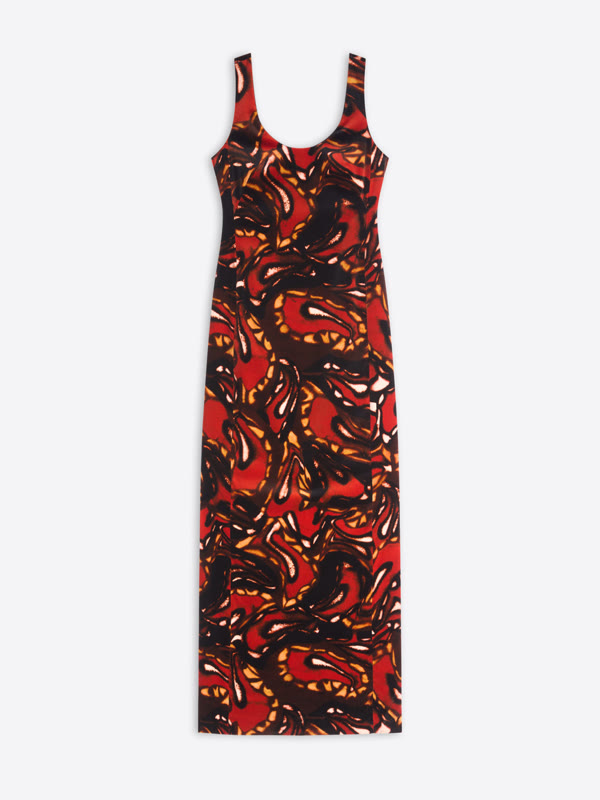
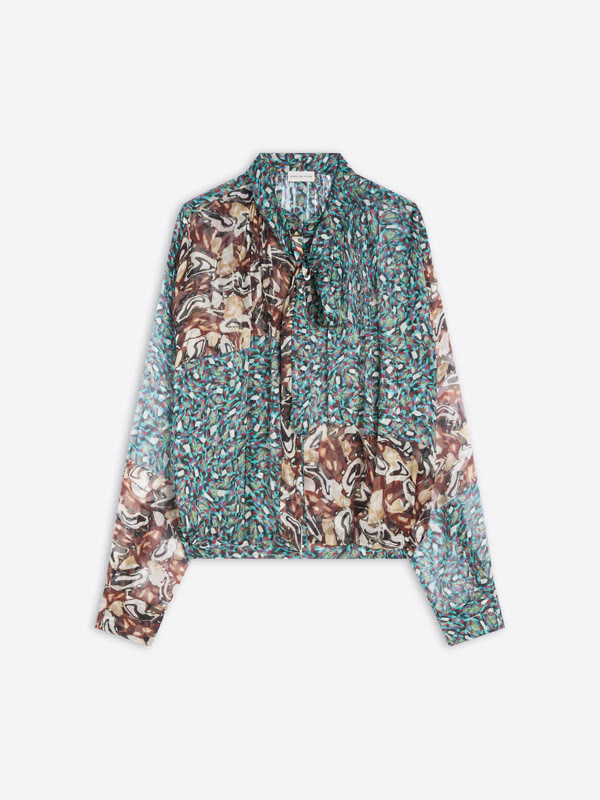
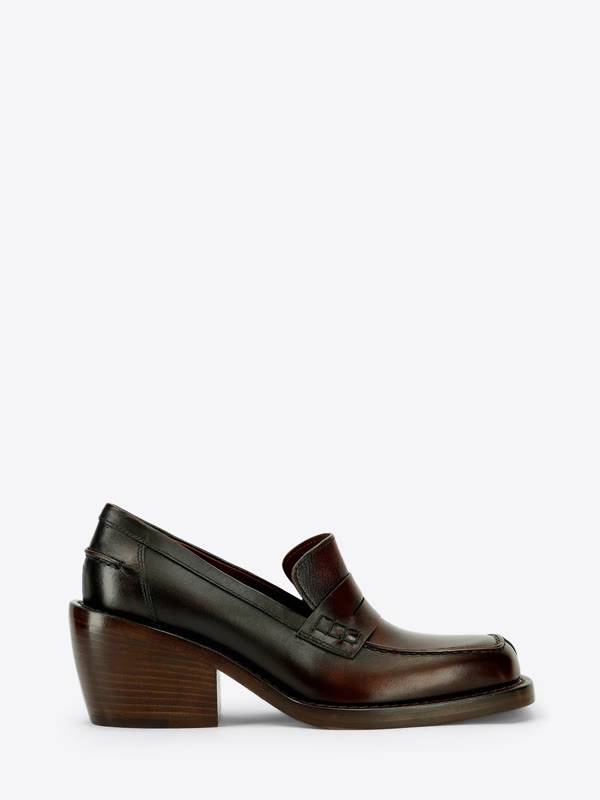
Product photographs: Dries Van Noten. Individual photographers not listed on the source pages. Click a garment name for the original product page.
02 · Generated first frame · S31
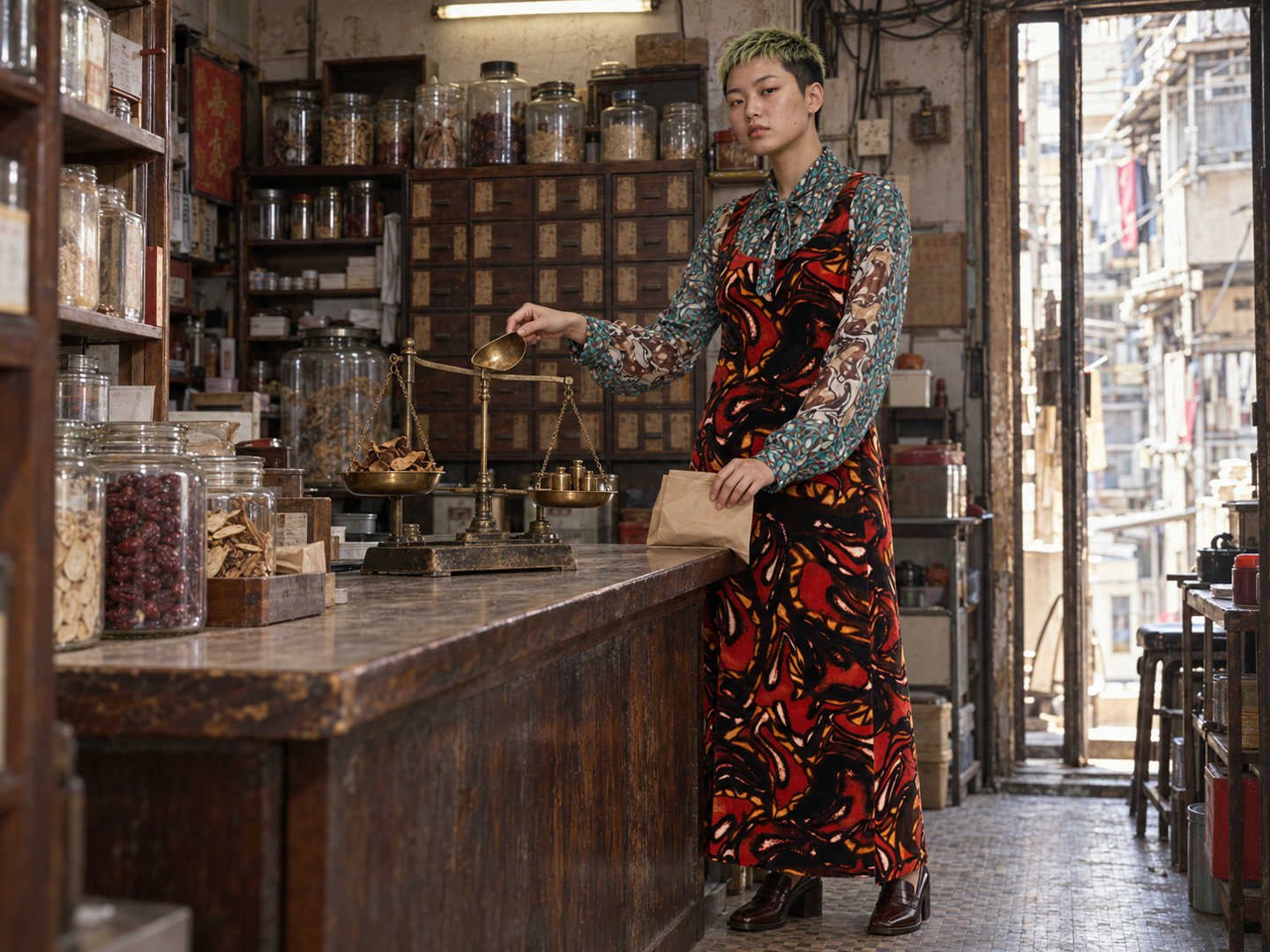
03 · Five-second motion take
Read the saved motion direction
Starting from the exact scoop position in the image, the woman moves the scoop a short distance to camera-left until it is above the ingredient pan. She gently tips a few small pieces of dried peel onto the existing pile, then holds the empty scoop above that pan.
Excerpt from the submitted prompt. Wan 3, requested 1080p, five seconds. First frame v001; motion take m001.
For the arcade, I combined a checked seersucker bomber , floral wrap skirt and low ballerina sneakers. I used a 22-frame glimpse of the five-second take in the edit.
01 · Real garment references
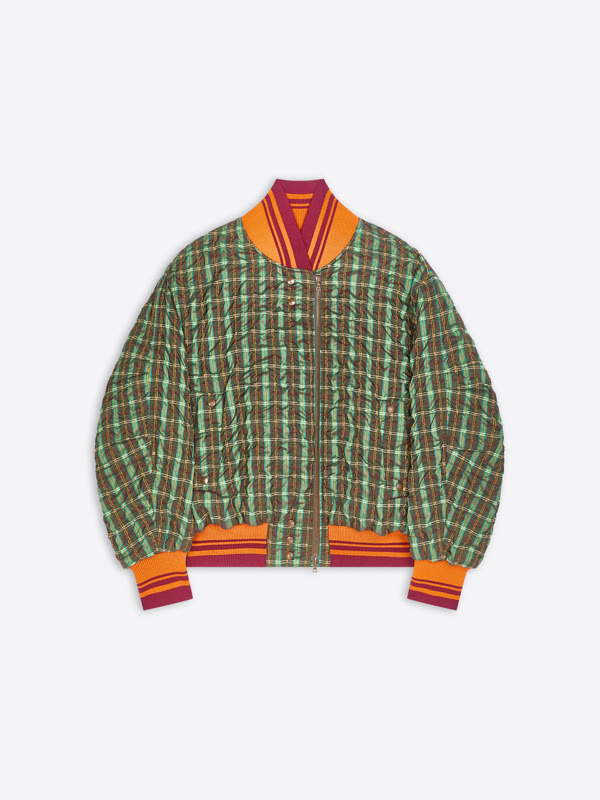
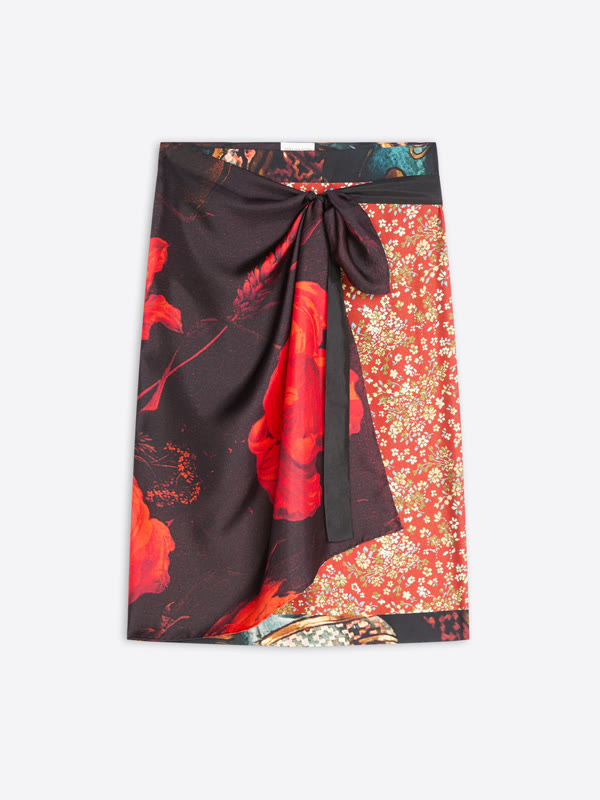
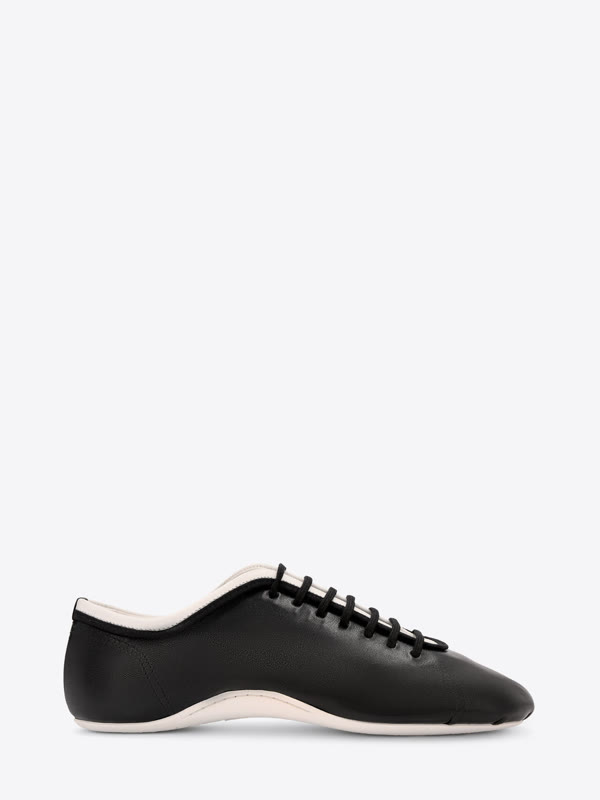
Product photographs: Dries Van Noten. Individual photographers not listed on the source pages. Click a garment name for the original product page.
02 · Generated first frame · S30
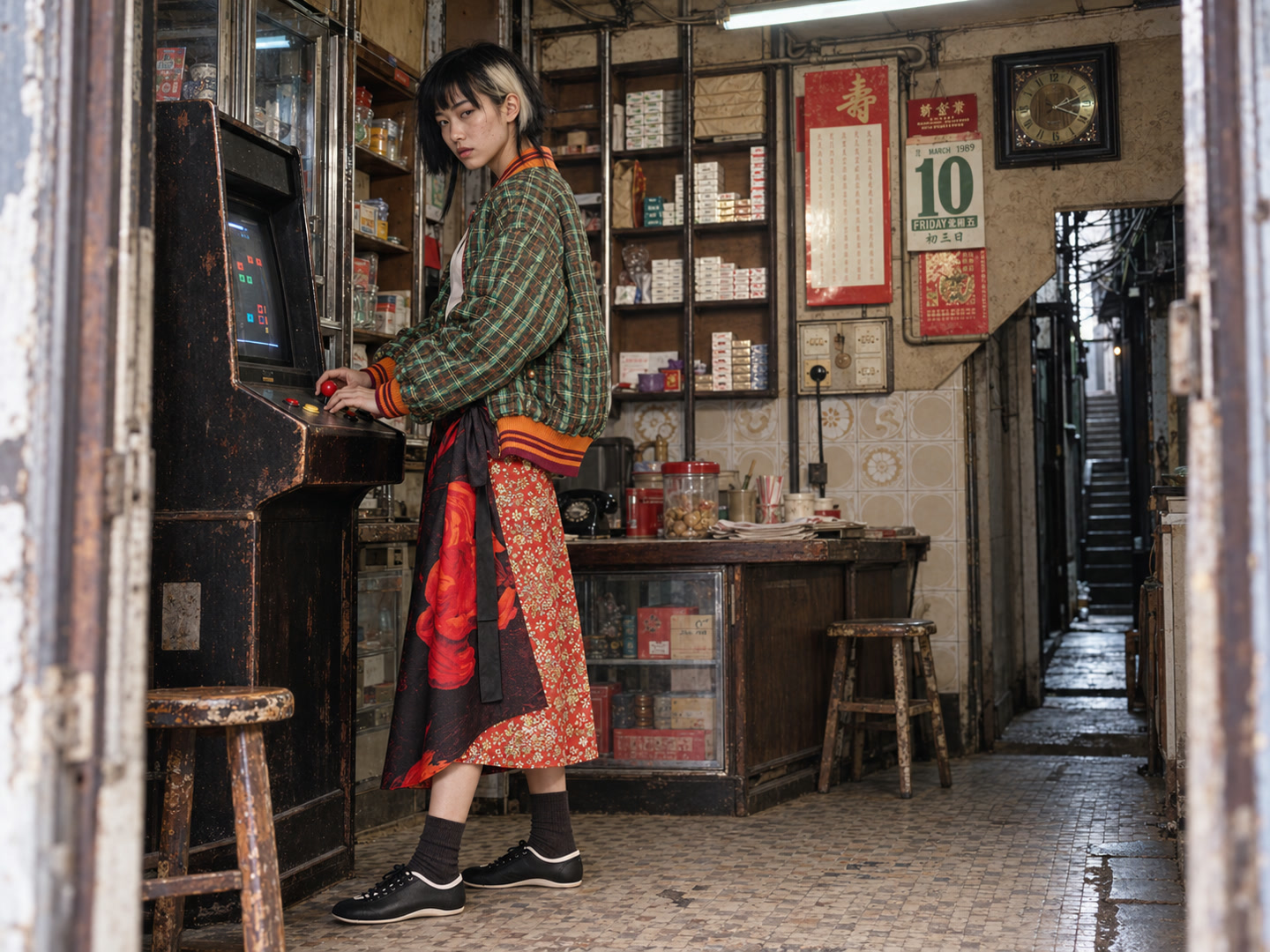
03 · Five-second motion take
Read the saved motion direction
The woman slowly turns her eyes and head from the doorway back toward the arcade screen. Her joystick hand nudges the red ball joystick once, while her other hand taps one button without changing its wrist position.
Excerpt from the submitted prompt. Wan 3, requested 1080p, five seconds. First frame v001; motion take m001.
Compare the source photos with the generated frames. You can recognise the styling, but the model redraws the garments. Fine prints drift. A silver trainer can come back off-white. I treat these as generated interpretations, and keep the product images beside them so I can see what changed.
Make the first frame before you buy movement
I used the GPT image-generation tool available inside my agent session for the stills. The tool didn’t expose a model version, so I can’t give you an honest version number. We saved 34 frame versions across 30 scenes.
The reference pack for a frame had separate jobs: one image for the face, product photographs for the clothes, an architectural reference for surfaces and room density. I told the model which job belonged to which image, including that the catalogue model’s face wasn’t part of the wardrobe reference.
The image tool accepted at most five references in this session. I chose that short ingredient list before asking the model to combine it.
I asked for clean 4:3 frames with room around the hands and feet. You need to see whether a hand holds the scoop before you ask it to pour. Tape noise and camera shake make that inspection harder, so I left the analogue treatment for the edit.
The first-frame brief describes the person, clothes, starting pose and camera position. Leave space for the next action: a roof-walking shot needs somewhere to walk.
Give the agent a scene record
Codex coordinated the research, file handling and generation calls. We used a small production structure: scene IDs, cast IDs, wardrobe records and a source register. The project ended up with 33 scene records and 56 registered references. Some scenes stayed at the brief or still stage.
The herbal shop is S31. Its first image is v001; its first motion take is m001. Each take points back to the exact frame it used. We saved the prompt, input references, model identifier when available, parameters and output receipt together.
- 01Find garment and place references
- 02Write the scene and cast brief
- 03Generate a clean first frame
- 04Inspect the face, clothes and grip
- 05Save the frame version
- 06Submit and track the motion job
- 07Download, check and catalogue
- 08Select and edit in Final Cut
Revisions got new filenames. We kept the earlier image and its original brief. That let me compare a new look with the previous version without trying to reconstruct a conversation.
The agents could research clothing while I reviewed scenes, and prepare more stills while video jobs ran. A private gallery brought the references, frames and clips together. I could review it from my phone. The gallery read the scene records, so we didn’t have to maintain a second handwritten shot list.
For video, the agent uploaded the first frame, submitted the job and saved its prediction ID. It checked that same ID until the job finished, then downloaded the output. After an uncertain response, the next step was to reconcile the job state before creating another job. Otherwise, you risk paying twice for the same request.
We kept failed attempts in the records to explain missing clips and avoid repeating work.
Direct one action across five seconds
I used Replicate for the motion jobs. Wan 3 produced 22 of the 24 completed clips. We also completed one Runway Gen-4.5 test and one Seedance 2.5 test.
The still already contained the face, clothes and room. The motion prompt concentrated on the change over five seconds, with explicit instructions to preserve those details and hold one continuous shot.
For the herbal shop, the saved direction included this passage:
Starting from the exact scoop position in the image, the woman moves the scoop a short distance to camera-left until it is above the ingredient pan. She gently tips a few small pieces of dried peel onto the existing pile, then holds the empty scoop above that pan.
“Starting from the exact scoop position” mattered. The generated still had placed the scoop higher than the original brief described. We directed from the image we had.
I kept the action small: two steps with the stools, a glance at a screen, a short pour. For a new project, test the gesture your film depends on before generating a large batch. Our first motion pilot showed hanging clothes. I wanted people, and that pilot told me nothing about faces or hand movement. We changed the test.
The generation bill, with its boundaries
These are published-rate estimates checked on 22 October 2026, calculated from the saved project jobs. I haven’t reconciled them against an invoice.
| Video model | Completed clips | Settings and listed rate | Estimate per 5-second clip | Subtotal |
|---|---|---|---|---|
| Wan 3 | 22 | 1080p, US$0.20/second | US$1.00 | US$22.00 |
| Runway Gen-4.5 | 1 | US$0.12/second | US$0.60 | US$0.60 |
| Seedance 2.5 | 1 | 720p, non-video input, US$0.2312/second | US$1.156 | US$1.156 |
| Total | 24 | 120 seconds of requested candidate footage | US$23.756, rounded to US$23.76 |
The current Wan setup cost an estimated US$1 per five-second candidate. A usable shot can cost more if you need several attempts.
Six failed video predictions also appear in the ledger. We assigned those zero in the estimate under Replicate’s failed-run billing policy . We counted unique prediction IDs, so an original MP4 and its silent editing copy didn’t become two paid generations.
The image tool exposed no per-image charge or subscription allocation. Image generation, agent and tool subscriptions, my time and editing are outside this figure. Taxes, discounts and credits aren’t reconciled either. US$23.76 is the video-generation estimate, not the cost of making the whole film.
Inspect the motion
We checked the downloaded files with ffprobe, decoded them with ffmpeg and reviewed six sampled frames per clip. Those checks caught technical failures and visible changes; they don’t prove that every moment moves well. You still need playback and an edit decision.
The Runway manicure test inserted a cut around 2.79 seconds into a shot that should have held. In the lantern study, the model lowered a paper strip onto the bench instead of attaching it to the lantern. I kept a short part of that take in the film, using the gesture the model produced. The full clip still fails the original direction.
We preserved the provider originals and made silent editing copies without re-encoding the video.
Cut the moments in Final Cut Pro
The saved Final Cut project references 22 of the 24 generated takes, alongside three archival footage sources. I cut in a 1080p, 24fps project and exported the 46.625-second film at 720p.
All three wardrobe examples above appear in the edit. Each started as a five-second generation:
| Scene | Starts in the film | Length used |
|---|---|---|
| Carrying the red stools | 11.83 seconds | 1.29 seconds |
| Arcade | 19.38 seconds | 0.92 seconds |
| Herbal shop | 20.29 seconds | 1.17 seconds |
I needed the arcade model’s face, clothes and hand on the controls to read for 22 frames. The longer source take gave me room to choose that moment in the timeline.
I kept the finishing in Final Cut. The project has a Dehancer Pro v7 adjustment layer across the film, Pro Zoom on the money-counter shot, and shake and glitch effects on selected passages. Keeping those treatments in the timeline let me tune them against the archive footage after choosing the cuts.
The archive inserts, music and street ambience belong to this editing stage. The automated generation supplied candidate footage; I chose how it sat beside the existing Hong Kong images and where to cut.
Footage and sound
These are the source files referenced by the saved project:
- Archive: Life in Kowloon Walled City , Kowloon Walled City: “And the Walls Came Tumbling Down” (1984) , and Chika Asamoto in Hong Kong, 1988: STRAY .
- Music: “Pump That Shit Up” by Jammin The House Gerald .
- Street ambience: Walking in Hong Kong Causeway Bay: Immersive Street Sounds Walk , matching the named ambience file in the project.
To try the process, start with one garment photograph, one character and one action. Save the sources and brief together. Generate a still, inspect the face and grip, then freeze that version and animate five seconds. Watch it in a timeline before commissioning the next batch.
Bring that first scene to an AI workshop . We can build the reference and generation workflow around a shot you want to use.
Interested in this?
Learn about Creative Production →